Lesson 3 · ~7 min
The Carbon Footprint of a Device.
Most of the environmental cost of a laptop is paid before it ever reaches you. By the time the box is unpacked, three quarters of the device's lifetime CO₂ has already been emitted — in mining, manufacturing, and shipping.
This lesson is the why behind extending device lifetimes. It explains where the emissions come from, why the use phase is much smaller than people assume, and what that means for everyday decisions.

Where the emissions actually come from
The shape of the lifecycle
• Manufacturing — raw-material extraction (mining), refining, semiconductor fabrication, component manufacturing, final assembly.
• Transport — shipping from the assembly site (usually China, Vietnam, Taiwan) to regional distribution and finally to the buyer.
• Use — electricity consumed during the device's working life.
• End of life — collection, dismantling, recycling, disposal.
For most modern IT devices, the breakdown is heavily skewed toward manufacturing. A widely-cited Dell whitepaper for the XPS 13 9310 — used here as a typical case — gives:
Lifetime CO₂ breakdown of a typical laptop
| Phase | Share | Approx. kg CO₂e | What it covers |
|---|---|---|---|
| Manufacturing | 81 % | ~262 kg | Mining, fabrication, assembly, packaging |
| Use (4 years) | 14 % | ~45 kg | Electricity over a 4-year service life |
| Transport | 4 % | ~14 kg | Air freight from China to Europe, regional distribution |
| End of life | <1 % | ~1 kg | Collection, recycling, disposal |
Source: Dell Product Carbon Footprint, Dell XPS 13 9310 (2021). Independent studies of 230 laptops by IT Recycling give a similar 75–85 % share for manufacturing.
Why manufacturing dominates
It's the materials, not the assembly
The motherboard alone typically accounts for more than 20 % of a laptop's lifetime carbon footprint. The display, SSD, and integrated circuits add most of the rest. The chassis, keyboard, battery and packaging are comparatively cheap, environmentally.
Why? Two reasons:
• Semiconductors are absurdly resource-intensive. Producing a single 30 cm silicon wafer takes thousands of process steps in a cleanroom kept hundreds of times cleaner than a hospital operating theatre. The wafer goes through extreme-UV lithography, ion implantation, dozens of chemical baths and rinses. The energy and chemical input per gram of finished chip is enormous.
• The supply chain is global and shipped frequently. Raw materials are mined in one continent, refined in another, fabricated in a third, assembled in a fourth, and shipped in air freight to a fifth. Each step adds emissions.
Correct.
Not quite — review the section above.
What this means for individual choices
The hierarchy of impact
This is not to say that energy-efficient use doesn't matter; it does. But the leverage is elsewhere. The single most environmentally consequential decision around any IT device is how long it stays in service.
What actually moves the needle
| Action | Approx. CO₂ saved | Magnitude |
|---|---|---|
| Keep the device 6 years instead of 3 (one extra cycle) | ~250 kg | Huge |
| Buy refurbished instead of new | ~220 kg | Huge |
| Repair rather than replace at year 3 (battery + SSD) | ~180 kg | Large |
| Use cloud storage less aggressively | ~10–20 kg | Small |
| Switch screen to dark mode | ~5–10 kg | Small |
| Close unused browser tabs, dim screen brightness | ~2–5 kg | Trivial |
| Shut the laptop down at night vs sleep | ~1–3 kg | Trivial |
The first three rows belong on every sustainability poster. The bottom four are not wrong — they save real energy — but they are roughly two orders of magnitude smaller than extending the device's service life.
Correct.
Not quite — review the section above.
The smartphone case
Smaller device, same logic
Most recent smartphones (iPhone 15, Samsung S24, Pixel 8) sit between 55 and 80 kg CO₂e over a typical service life — and the manufacturing share is consistently dominant.
The practical implication is the same as for laptops: keeping the phone an extra year matters far more than any in-use optimisation. Battery replacements (€30–80 at most repair shops) typically extend phone lifespan by 2–3 years, at a fraction of both the cost and carbon impact of replacement.
Why this matters for the rest of the course
Connecting the dots
• Lesson 1 — planned obsolescence is real, structural, and increasingly regulated. Devices fail sooner than they should, often by design.
• Lesson 2 — Moore's Law has slowed. A 5-year-old laptop is no longer meaningfully outclassed by a new one for everyday work.
• Lesson 3 — manufacturing emissions dominate the lifecycle. Extending service life is by far the highest-leverage environmental decision.
Taken together, these three facts make the case that the most sustainable device is the one already in use — and that the framework for acting on this principle is the 4 R's: Reuse, Repair, Refurbish, Recycle, in that order. That's the subject of the next lesson.
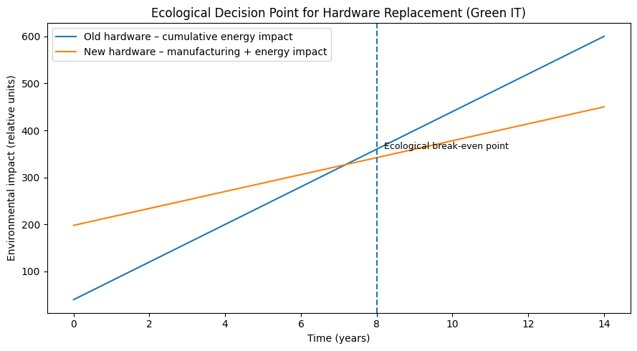
The ecological break-even point